Showing posts with label Windows. Show all posts

Download StartW8 1.1.41.0

Posted by Unknown on Monday, June 3, 2013

Download StartW8 1.1.41
StartW8 1.1.41.0
Download StartW8 1.1.41.0. Start menu is an important feature in Microsoft Windows. The existence of the Start menu in Microsoft Windows is very useful for its users. Starting from Windows 95/Windows 200/WindowsXP/Windows 7. However, since the introduction of Microsoft's latest operating system Windows 8, the start menu has been deleted and replaced with the Metro UI interface for a greater experience. However, for some users they feel uncomfortable.

StartW8 is a powerful tool that is developed for Windows 8 users. StartW8 help user to restore the start menu in Windows 8. Users can easily access applications, folders, search for files or program by entering the relevant keywords, or the user can simply turn off their PC, reboot or switch users. It's free, quick & easy!

StartW8 - Features

  • Automatically switch to desktop immediately after signing in
  • Added Windows Start menu in Windows 8 design, but Windows 7 functionality
  • Activate menu with Win key
  • Log off, lock and turn off buttons
  • Traditional search field
  • Favourite applications
  • All user configurable
  • Support for silent installation
  • Multilanguage support (25 languages)
  • Option to ignore the Hot corner

What's New in StartW8 1.1.41 - Changelog

  • Option to ignore both right Hot corners
  • Option to ignore top left Hot corner
  • 7 new translations included (Danish, Finnish, Japanese, Lithunian, Slovenian, Swedish, Turkish)
  • Automatic check for update
  • The list of recent items is filled immediately after the installation
Download : StartW8 1.1.41.0 | 1.40 MB
Continue Reading Download StartW8 1.1.41.0

Free Photo Editing For Windows Phone 7

Posted by Unknown on Wednesday, December 21, 2011

Free Photo Editing For Windows Phone 7
Your Windows Phone 7 users? You may not know the application that helps you to editing a photo, although less prestige than its rivals but the ability to take pictures of Windows Phone 7 is very good. Well if you are interested in editing photos, you can use some app the following options :

1. Bubblegum

Bubblegum

Bubblegum is a tool for taking photographs, and apply a variety of fun effects and then you can share them with friends via Twitter, Facebook or Foursquare. You can also 'follow' your friends and other users to see the last photo taken around the world. With this tool you can create effects - Black & White, Woodstock, Frosty, Grunge, Tilt Shift, cyano, Aurora, History (sepia), etc.

Download

2. Colorize

Colorize

Colorize is an application that allows you to add color to the image and also make photos black and white. You can zoom and rotate images and adjust only the smallest details or you can enlarge the size of the brush and brush on it.

Download

3. Photo Finish

Photo Finish

Photo Finish provides you with the tools necessary to add the finishing touches on the pictures taken. Convert images to the tone (grayscale, sepia, etc.) or add a watermark before you upload or even resize / rotate, etc..

Download

4. PhotoFunia

PhotoFunia

PhotoFunia is a tool that gives you a pleasant experience. This application can automatically identify faces in your photos and you can add cool photo effects and create funny face photo montages. PhotoFunia is a free app and is very easy to use. Simply select the effect you like from over 100 different effects, select your photos, and PhotoFunia will handle it for you.

Download

5. Photo FX FREE

Photo FX FREE

Photo FX Free help you transform your ordinary photos into stunning photo. You can crop the image, Adjust effects such as Sepia, Black and white, color Vintage, (monotone), Manual (brightness, contrast, sketch), etc. This application is also integrated with the Photo Extras.

Download

6. Photo Splash Effect

Photo Splash Effect

Photo Spalsh Effect is another tool that can quickly and easily reinforce your photos by applying filters, while preserving the details in color choices. It comes with an intuitive user interface and responsiveness make it super easy and fun to use. Simply select the effect and use your finger as a brush to bring back the effects of the applied areas of your image. This application is free but for a limited time.

Download

Continue Reading Free Photo Editing For Windows Phone 7

Microsoft Zune Skin Pack for Windows 7

Posted by Unknown on Friday, December 16, 2011

Some time ago, I had to share the theme of MAC OS X Lion Skin Pack for Windows 7. Now on this Occasion I Will share, Microsoft Zune Skin Pack for Windows 7.

Microsoft Zune Skin Pack for Windows 7


Zune Skin Pack is a new transformation pack for Windows 7 was created by "hameddanger" @ DA that converts the interface of Windows 7 to the Zune player.

Transformation pack is equipped with the Zune theme, boot screen, login screen, icons, toolbars, and others of course.

Microsoft Zune Skin Pack Screenshoot

Microsoft Zune Skin Pack

Microsoft Zune Skin Pack can be properly installed in Windows 7 SP 1 either 32 bits or 64 bits.

Download :
Microsoft Zune Skin Pack for Windows 7 (32-bit)
Microsoft Zune Skin Pack for Windows 7 (64-bit)
Continue Reading Microsoft Zune Skin Pack for Windows 7

MAC OS X Lion Skin Pack for Windows 7

Posted by Unknown on Sunday, August 21, 2011

MAC OS X Lion Skin Pack for Windows 7. At some time ago, I was talking about Windows 8 Skin Pack for Windows 7 and Windows 8 Skin Pack for Windows XP, now on this occasion I will share, Mac OS X Lion Skin Pack for Windows 7. Mac OS X Lion is the latest operating system from the MAC OS.

MAC OS X Lion Skin Pack


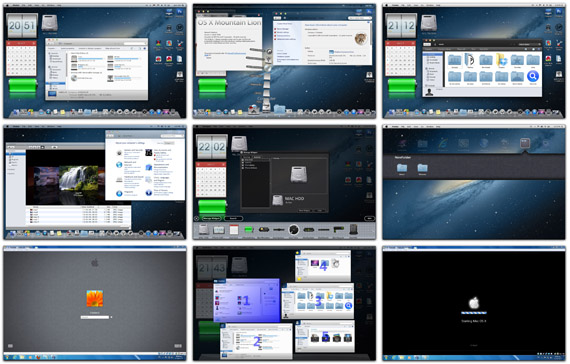
MAC OS X Lion Skin Pack is a customization package for users of Windows 7 that can make your Windows look like Mac OS X Lion. Transform Windows 7 skin pack to change almost everything in Windows 7 to turn it into Mac OS X Lion. such as the login screen, boot screen, wallpaper, themes, start button, icons, etc. It also installs a few utilities to provide functionality Mac.

MAC OS X Lion Skin Pack Screenshoot

MAC OS X Lion Skin Pack for Windows 7
MAC OS X Lion Skin Pack


Mountain Lion Skin Pack 2.0

Mountain Lion Skin Pack 2.0

MAC OS X Lion Skin Pack for Windows 7 can be properly installed in Windows 7 SP 1 either 32 bits or 64 bits.

Note : Before installing Transform Windows 7 make sure you create a restore point first.

Download :
MAC OS X Lion Skin Pack for Windows 7 (32-bit)
MAC OS X Lion Skin Pack for Windows 7 (64-bit)

Mirror Download :
Mountain Lion Skin Pack 2.0 for Windows 7 (64-bit)
Mountain Lion Skin Pack 2.0 for Windows 7 (32-bit)
Continue Reading MAC OS X Lion Skin Pack for Windows 7

Windows 8 Skin Pack for Windows XP

Posted by Unknown on Saturday, August 20, 2011

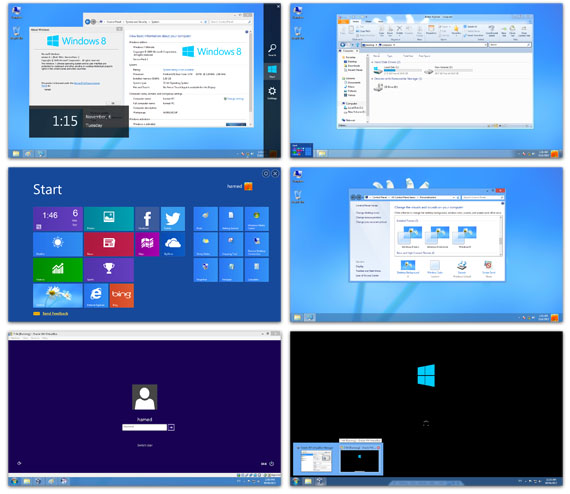
Windows 8 Skin Pack for Windows XP. At some time ago I was talking about Windows 8 Skin Pack for Windows 7. On this occasion, for users of Windows XP can also do a Transform Windows XP to Windows 8 with "8 skins pack". Windows 8 Skin Pack for Windows XP, installed on Windows 8 theme, boot screen, login screen, icons, wallpaper, etc. To make Windows XP look like Windows 8.

Windows 8 Skin Pack for Windows XP Screenshoot

Windows 8 Skin Pack for Windows XP

8 Skin Pack


Windows 8 Skin Pack for Windows XP

Supported on all Windows XP Media Center Edition and Server 2003. Support for Windows XP SP1, SP2 and SP3 and the version of 32-bit and 64-bit.
Interested in trying out Windows 8 Skin Pack for Windows XP?

Note : Before installing Transform Windows XP make sure you create a restore point first.

Download : Windows 8 Skin Pack for Windows XP
Mirror Download :
Windows 8 Skin Pack for Windows XP
Continue Reading Windows 8 Skin Pack for Windows XP

Google Translator Client for Windows

Posted by Unknown

Google Translator Client for Windows. Transmiti is a new freeware for Windows which is a client of Google Translate. Transmiti.org makes it easier to translate every word into your language by clicking a button. You can just select the text in the application or window and press the Windows key on your keyboard to pop up a small dialog with the translation.

Google Translator Client for Windows

Google Translator Client for Windows

Translate selected text or entire documents in no time with the Windows key!
  • Totally free! No Registration required.
  • No installation needed. No administrator- or power-user rights needed.
  • All languages are supported, to which the Google Translator is capable of.
  • Optionally, the selected text will be replaced directly with the translation.
  • Automatic bidirectional translation of the source- and the target-language.
  • Single words or phrases can be searched in the "Google dictionary".
  • Proxyservers - even with authentication - are supported since version 1.71.

Interested to try Google Translator Client for Windows?

Download : Google Translator Client for Windows
Continue Reading Google Translator Client for Windows

Repair BSOD Windows 7 STOP: 0x0000006B

Posted by Unknown on Wednesday, August 3, 2011

What is BSOD? BSOD stands for Blue Screen of Death. There are some cases that caused the BSOD one of which is the BSOD error STOP: 0x0000006B in Windows 7, some people may feel frustrated when a case of this BSOD and some computer users when the blue screen to reinstall Windows. I personally had never experienced it and had to reinstall Windows because they do not want to bother. But if you are having problems with the above code you can try this way.

Microsoft Company has identified a problem in Windows 7 that crashes (BSOD) during the process began with the STOP: 0x0000006B error message and fail to boot. Detailed error message looks like below :


STOP: 0x0000006B (Parameter1, Parameter2, Parameter3, Parameter4)
PROCESS1_INITIALIZATION_FAILED
This problem occurs because the file is corrupted or because of the size Bootcat.cache Bootcat.cache files changed since the beginning of the last successful star up Windows. Fortunately, Microsoft has released fixes for this problem in Windows 7 Service Pack 1. 

But if you do not want to bother downloading Windows 7 SP1 you can use the following simple way is to start a computer running Windows 7 from the hard disk or from a bootable USB drive using Windows installation media and then you delete the file Bootcat.cache, and then restart the computer. Bootcat.cache file located in : % SystemRoot% system32 codeintegrity


Continue Reading Repair BSOD Windows 7 STOP: 0x0000006B
 

About Us | Contact Us | Privacy Policy